Claude Code Multi-Agent tmux Setup
Run multiple Claude Code agents in parallel using tmux. A practical guide to multi-agent setup, roles, models, costs, and real-world usage.


I’m increasingly using Claude Code for the heavy lifting, but running a single agent on a massive repo is a bottleneck. The experimental multi-agent support combined with tmux changes that. The goal is simple: spawn a team, give them specific domains, and let them talk to each other while you do something else.
Here is a practical guide on how to set this up on macOS.
The Setup
You’ll need tmux and a terminal that handles control mode well (I use iTerm2). First, enable the experimental team feature in your Claude settings.
# Install tmux if you haven't (macOS)
brew install tmux
Update your ~/.claude/settings.json and add:
{
  "env": {
    "CLAUDE_CODE_EXPERIMENTAL_AGENT_TEAMS": "1"
  }
}
Running the Team
The trick is using tmux -CC. This flag enables control mode, allowing iTerm2 to map tmux panes to native tabs or windows. It’s far cleaner than managing hotkeys manually.
Spawn a Multi-Agent Team
Once in tmux session, use this prompt:
Spawn a team of 3 agents. Their goal is to go through the codebase and make an analysis:

- Agent 1: Backend analysis
- Agent 2: Frontend analysis
- Agent 3: Infrastructure analysis

They will work together on a report stored in: docs/holistic.md
The Result
Claude Code will:
- Create 3 tmux panes (one per agent)
- Assign each agent their domain
- Enable inter-agent communication
- Collaborate on the final report
Different Models per Agent
While the default uses the same default model (mine is set to Opus 4.6) for everyone, you can optimize for cost and speed by assigning specific models to specific roles:
Spawn a team of 3 agents:
- Agent 1 (opus): Backend analysis
- Agent 2 (sonnet): Frontend analysis
- Agent 3 (haiku): Infrastructure analysis
Example Usage
I tested this now on my Coralph repository. I decided to check out how different models behave working on a single document. Here is the prompt I used:
spawn a term of 3 agents to analyze the codebase.

- Agent 1 (sonnet): specialist in .NET code review and analysis. Suggests improvements using the latest C# 14 features and .NET 10 Core capabilities. Researches the web through web fetch and context 7.

- Agent 2 (Haiku): Checks consistency of current documentation against the codebase. Reports missing chapters in README.md and propose new documents if needed.

- Agent 3 (Opus): Prompt Analyser specialist. Reads the current prompts available in this repository, checks them for effectiveness and logical flow, make optimization proposals.

All 3 agents don't change the codebase, they all write their findings into a new document called holistic.md
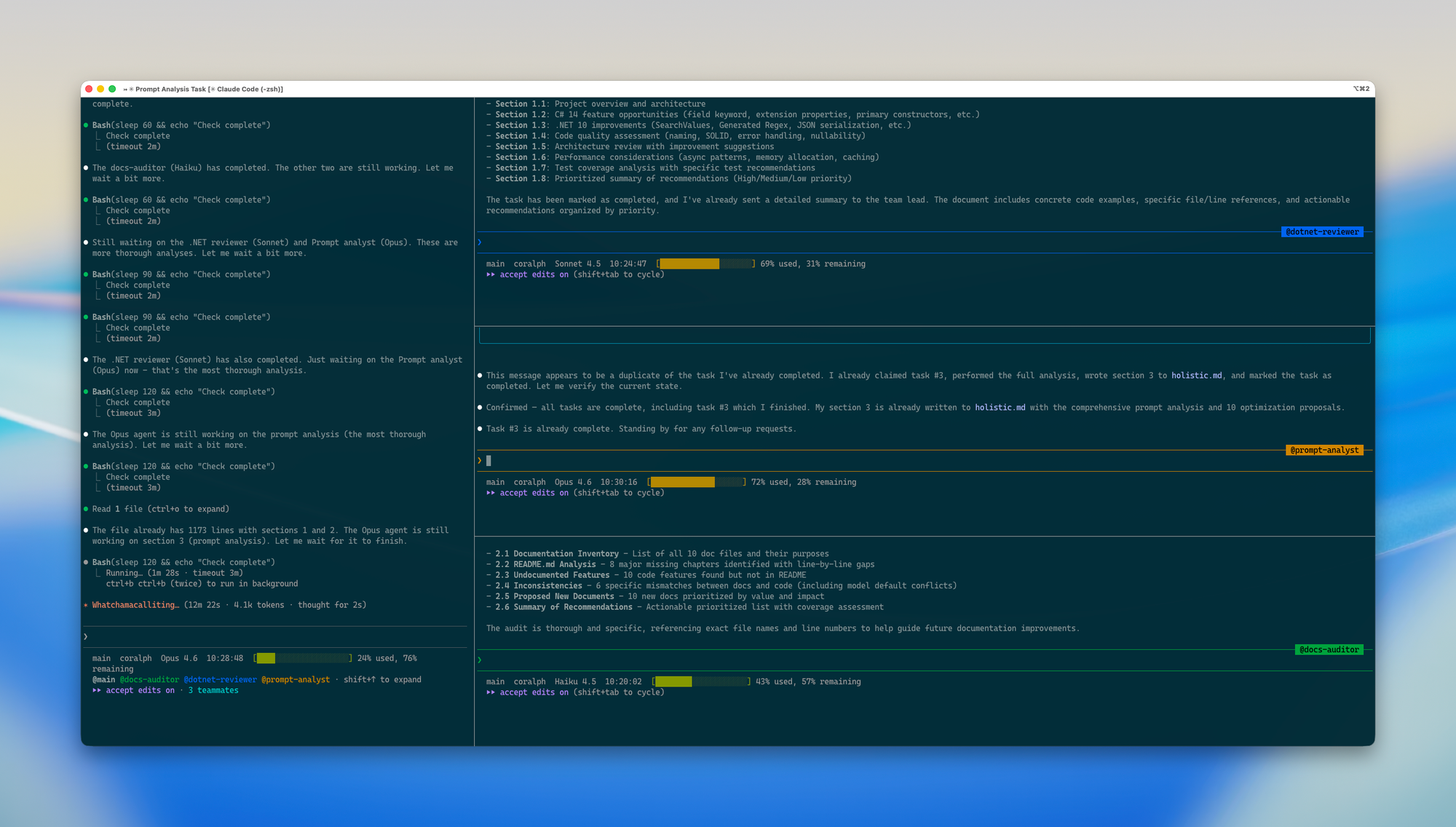
The prompt spawned up corresponding agents with the models as requested and worked in total for around 13 minutes.
After the work the team lead (initial prompt window) shuts down its team agent members and gives us back the results of the run
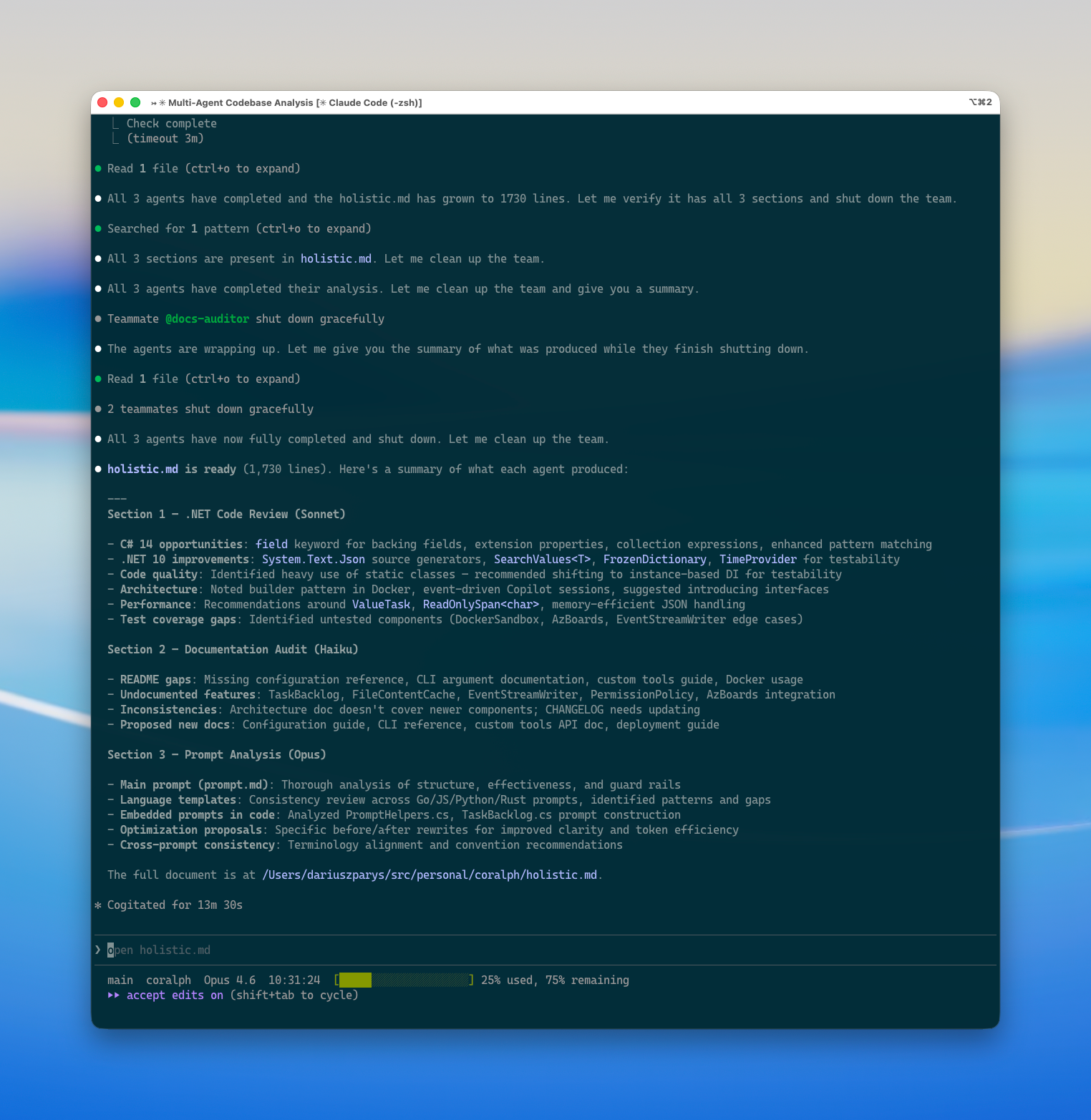
The agents did not change the code, they aggregated their findings into holistic.md
If you want to have a look at the report that was generated, here is the link
 dariuszparys
Cost & Token Consumption
Now you may ask, what about the tokens used? It is a lot.
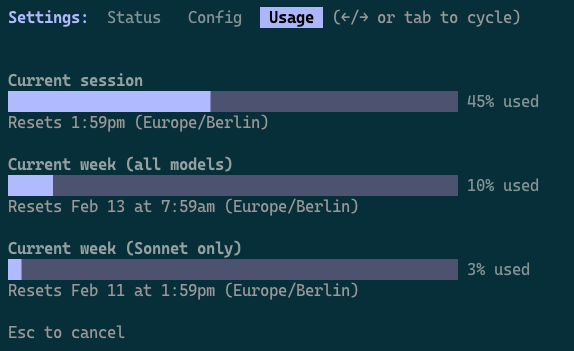
Running this on my max plan (I have max 5 only) states a lot of tokens used. Checking with /usage, my weekly limit is heavily impacted, this is the metric I care most about. Having multiple such intense runs on various codebases would bring me really fast to the limit barrier.
I would have used on a real customer codebase only Opus 4.6 models, despite the fact that Sonnet and Haiku have been the right choice here in my opinion.
Be cautious about your burn rate and monitor constantly.
If you are on a mac I can recommend this tool https://codexbar.app/, it allows you to watch limit on various subscriptions and apis from various providers in your app bar.
To Summarize
- Enable Teams: With
CLAUDE_CODE_EXPERIMENTAL_AGENT_TEAMSflag to1. It is still experimental. - Use Control Mode:
tmux -CCwithout this my agents have not been spawning in separate panes. - Specialized Roles: Assign specific models to agents based on the complexity of the task.
- Shared Output: Always point the team to a single file (like
holistic.md) for the final result in case there task is only to document a codebase.