
I was asked on LinkedIn to provide more details on the current Claude Code setup I use. The project I work on is an enterprise grade one, including Azure DevOps, Bicep infrastructure, and a monorepo with .NET backend, Angular frontend, and IaC components. The out-of-the-box experience of Claude Code is good, but enterprise development has specific workflows that benefit from customization.
Specifically the integration with Azure DevOps is one of the main differences compared to most agentic coding harnesses which mostly use Github.
Here’s how I’ve set up Claude Code with custom slash commands, skills, hooks, rules, and agents to match how our team actually works.
The Challenge
Enterprise development isn’t just about writing code. It’s about:
- Understanding work items before touching a single file
- Following consistent patterns across a monorepo
- Reviewing infrastructure changes against organizational standards
- Tracking sprint progress and generating retrospectives
Claude Code can do all of this, but it needs context about your specific environment. That’s where customization comes in.
The Structure
My .claude/ directory looks like this:
.claude/├── settings.json├── agents/│ └── bicep-module-reviewer.md├── commands/rsu/│ ├── analyze-pbi.md│ ├── my-sprint-retro.md│ ├── my-sprint-work.md│ ├── optimize-pbi.md│ ├── pbi-tasks.md│ ├── prepare-pbi.md│ ├── sprint-retro.md│ └── sprint-summary.md├── rules/│ ├── 00-universal.md│ ├── 01-backend.md│ ├── 02-frontend.md│ └── 03-infra.md└── skills/ ├── azure-boards-skill/ │ ├── SKILL.md │ └── references/wiql-patterns.md └── azure-pipelines-variables/ ├── SKILL.md └── scripts/validate_pipeline_variables.pyThe rsu folder under commands is our project namespace. This keeps project-specific commands separate from any personal or general-purpose commands people might use in their environments.
Agents: Specialized Code Review
The bicep-module-reviewer agent is designed for infrastructure code review. When I modify Bicep files, I invoke this agent to check for consistency, best practices, and Azure Verified Module (AVM) opportunities.
What makes this agent useful is the frontmatter configuration:
---name: bicep-module-reviewerdescription: Use this agent when Bicep infrastructure files have been modified...tools: Glob, Grep, Read, WebFetch, TodoWrite, WebSearch, Edit, Write, Bash, mcp__context7__resolve-library-id, mcp__context7__get-library-docsmodel: sonnet---The agent has access to specific tools including web search (to look up AVM modules) and MCP tools for documentation lookup. I use Sonnet as the model for cost efficiency since this is a review task, not complex reasoning. You can also use the skills frontmatter field to auto-load specific skills when the agent is invoked - useful if you have domain knowledge packaged as skills that the agent should always have access to.
The agent’s review process:
## Review Process
### Step 1: Identify Changed Files
Focus on files in:
- `infra/bicep/` (main templates)- `infra/bicep/resources/` (reusable modules)
### Step 2: Consistency Review
- **Naming conventions**: Resources follow `{env}-{service}-{resource}` pattern- **Parameter patterns**: Consistent use of `@description`, `@allowed` decorators- **API versions**: Prefer stable versions over preview unless feature-required
### Step 3: Azure Verified Module (AVM) Analysis
For each resource type:
1. Check if an Azure Verified Module exists at https://aka.ms/AVM2. Compare the custom implementation against AVM capabilities3. Assess migration effort vs. benefits
### Step 4: Best Practices Check
Validate against Azure best practices:
- **Security**: Managed identities over keys, Key Vault references- **Reliability**: Availability zones where applicable- **Operations**: Diagnostic settings, tagging strategy
The output format is structured with clear sections for findings, AVM opportunities, and action items. This consistency makes it easy to act on the review.
Commands: Sprint Workflow Integration
Most of my slash commands integrate with Azure Boards through the azure-boards-skill. Let me walk through the key ones.
The Prepare-PBI Workflow
The /project:rsu prepare-pbi command is my most-used command. It combines analysis and optimization into a single workflow:

Phase 2 checks the PBI against specific criteria:
#### Title Analysis
- [ ] Is descriptive (not too short, > 5 words typically)- [ ] Clearly indicates what feature/change is needed- [ ] Avoids vague terms like "fix bug", "update code", "improvements"
#### Description Analysis
- [ ] Exists and is not empty- [ ] Explains **what** needs to be done- [ ] Explains **why** it's needed (business value/context)
#### Acceptance Criteria Analysis
- [ ] Acceptance criteria field is populated- [ ] Contains specific, testable conditions- [ ] Uses clear language (Given/When/Then or bullet points)
If the analysis fails, the command stops and provides recommendations. No point optimizing a poorly-defined PBI.
The optimization phase applies specific transformation rules to make the PBI LLM-friendly:
### Transformation Rules
1. **Compress File Paths**:   | Before | After |   |--------|-------|   | `routes/dev-routes.bicep`, `routes/test-routes.bicep` | `routes/{dev,test,prod}-routes.bicep` |
2. **Changes = Actions**: Each entry: `{file}: {what to change}`   - Bad: "Update the container app configuration"   - Good: "container-app.bicep: set `ingress.external` = false"
3. **Remove Obvious ACs**:   - "Deployment succeeds", "No downtime", "Tests pass" → remove   - Specific HTTP codes, portal status checks → keep
The result is a token-efficient format that Claude Code can work with effectively.
PBI Tasks: Breaking Down Work
Once a PBI is optimized, /project:rsu pbi-tasks generates implementation tasks:
## Task 1: Configure internal ingress
**Files**: infra/bicep/resources/container-app.bicep**Do**:
- Set `ingress.external` = `false`- Ensure `ingress.targetPort` unchanged  **Test**:- `az containerapp show -n <app> -g <rg> --query "properties.configuration.ingress"`
---
## Task 2: Add Private Link to Front Door origin
**Files**: infra/bicep/resources/front-door-route.bicep**Do**:
- Add `privateLinkLocation` property to origin- Add `privateLinkResourceId` pointing to Container App  **Test**:- Deploy to dev, check Portal → Front Door → Origins → Private Link status
The tasks are sequenced (infrastructure first, verification last) and each includes a concrete test command.
Sprint Commands
The sprint-related commands give me visibility without leaving the terminal:
| Command | Purpose |
|---|---|
/project:rsu:my-sprint-work |
My assigned, incomplete work items |
/project:rsu:my-sprint-retro |
Personal retrospective with velocity |
/project:rsu:sprint-summary |
Quick metrics: velocity, completion rate |
/project:rsu:sprint-retro |
Team-wide retrospective report |
All of these run WIQL queries against Azure DevOps. The skill ensures queries are always scoped to the correct iteration path to avoid listing sprints from another non active iteration.
Rules: Context-Aware Guidelines
With a monorepository, different parts of the codebase need different guidelines. I’ve split my rules into four numbered files, those have been created using a custom slash command which I use to create an optimized CLAUDE.md version.
rules/├── 00-universal.md # Applies everywhere├── 01-backend.md # Applies to backend/**/*.cs├── 02-frontend.md # Applies to frontend/**/*.ts└── 03-infra.md # Applies to infra/**/*.bicepEach rule file specifies its path scope in the frontmatter:
---paths: - backend/**/*.cs - tests/**/*.cs---The universal rules define the project context:
# RSU
Multi-tenant SaaS platform on Azure.
## Stack
- .NET 10 LTS, C# 14, FastEndpoints 7.1.0- Angular 20, Nx 22, Node v24 LTS- Azure Cosmos DB Serverless, Entra External Identities
## Domain Context
- **Multi-tenant**: Tenants have sites, users belong to tenant + site- **3 roles**: StandardUser, SiteAdmin, TenantAdmin
## Rules
- **API-First**: Update OpenAPI specs in `api/` BEFORE implementing endpoints- **Branch naming**: `TICKET_NUMBER-descriptive-title`- **Check `docs/adr/`** for existing decisions before proposing new patterns
The backend rules get into C# specifics:
## C# 14 Conventions
- **Collection expressions**: Use `[]` everywhere- **Primary constructors**: Standard for DI in handlers- **Records**: Required for commands, events, DTOs
## FastEndpoints 7.1.0
**Always use `Send.*Async` methods:**
- `Send.OkAsync()`, `Send.CreatedAtAsync<TEndpoint>()`- AVOID: `SendAsync()` (pre-7.1.0 pattern)
This level of detail prevents Claude from generating outdated patterns.
Skills: Reusable Knowledge Packages
Skills package domain knowledge that Claude needs to work effectively with specific tools.
Azure Boards Skill
This skill teaches Claude how to interact with Azure DevOps. The critical piece is the iteration scoping warning:
## Critical: Iteration Scoping
**ALWAYS** include iteration path filter in queries unless user explicitlyrequests a different iteration or "all iterations".
```bash# CORRECT - scoped to default iterationWHERE [System.IterationPath] UNDER 'rsu\\v2'
# WRONG - returns items from all projects/iterationsWHERE [System.WorkItemType] = 'Bug'```
The skill also includes a references/wiql-patterns.md file with common field names and query patterns. Claude loads this reference only when needed - keeping the main SKILL.md lean. Anthropic recommends keeping SKILL.md under 500 lines for optimal performance. Anything larger should be split into supporting files that Claude reads on demand.
Agents benefit from Progressive Disclosure. You can link to files and let the agent decide when it needs them. This is more token efficient than having everything in context from the start.
Using Azure Boards Skill
I showed how to use custom slash commands to work with PBIs. You can of course only use the skill and prompt it. In the following example I tell Claude to use the Azure Boards skill and create Product Backlog Items under an existing feature.
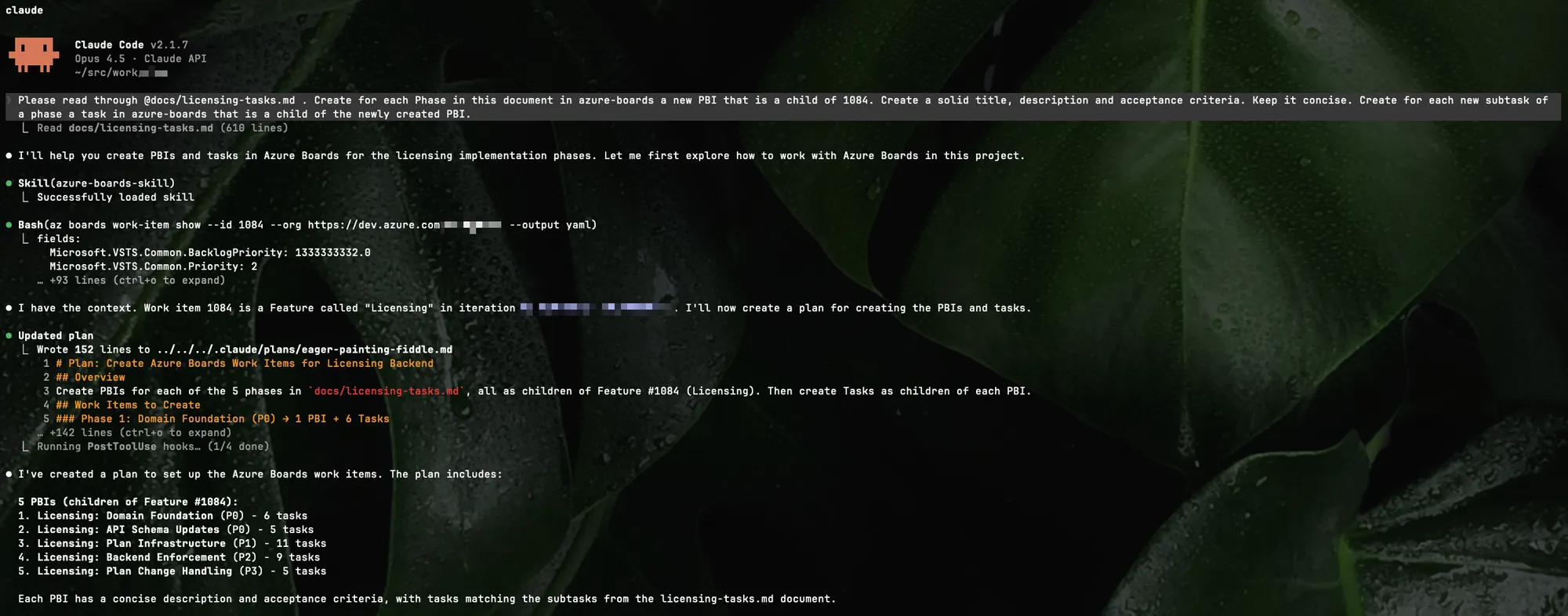
Prompting azure-boards skill to create PBIs
See the usage of the skill in the screenshot. Taken this task it reads out of the researched documents to create the proper PBIs.
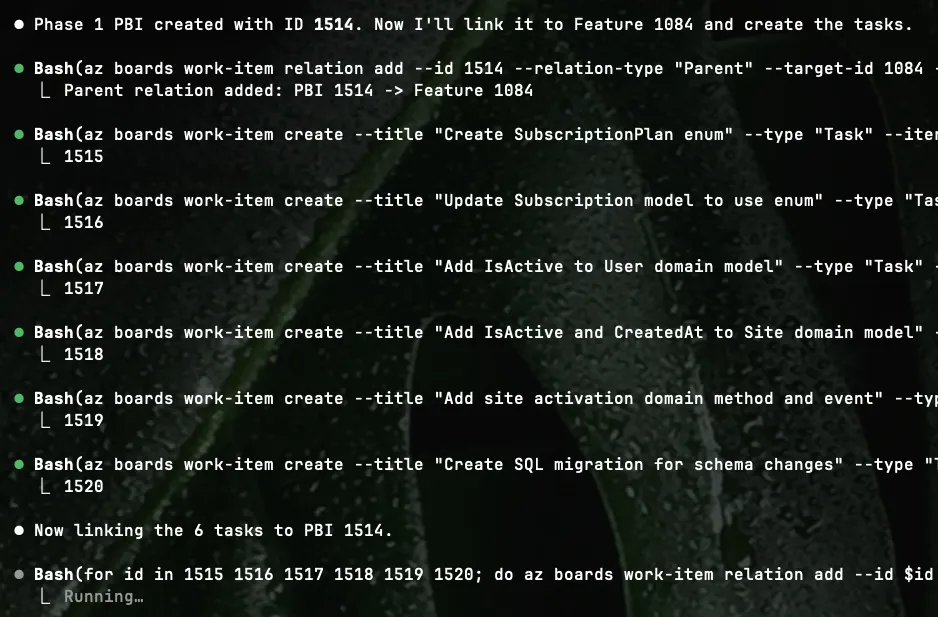
Creating PBIs in subsequent bash tasks
After a couple of minutes I have all the research that I did with Claude Code persisted into PBIs on my Azure Board. Tasks included.
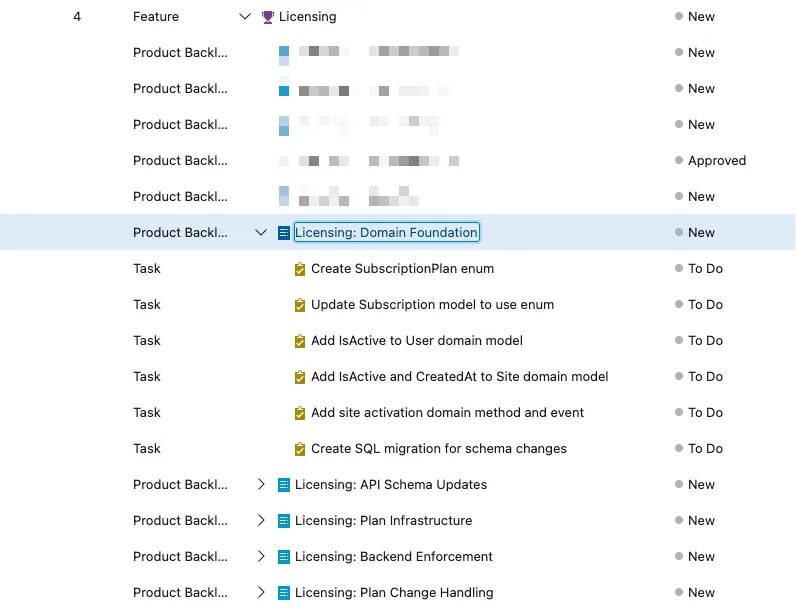
Created PBIs and tasks in the current project
Those PBIs have descriptions and acceptance criteria so a human person can pick up the work or an agent can pick up the work. It really doesn’t matter.
Hooks: Automated Quality Checks
Hooks run automatically after tool invocations. I use them for ADR documentation:
{ "hooks": { "PostToolUse": [ { "matcher": "Edit|Write", "hooks": [ { "type": "command", "command": "file_path=$(jq -r '.tool_input.file_path'); if echo \"$file_path\" | grep -qE 'docs/adr/.*\\.md$'; then ... markdownlint --fix \"$file_path\" ...; fi" } ] } ] }}When Claude edits an ADR file, the hook runs markdownlint automatically. A second hook regenerates the ADR index. This is more token efficient then letting Claude Code itself fixing the linting errors and generate the index.md file. If something can’t be autofixed by the linter, then Claude comes again into play, but not before.
The above hook is using an inline script which is not a good practise. Meanwhile I created a neutral version that I published to Github.
 GitHubdariuszparys
What I Learned
A few things I discovered while setting this up:
- Frontmatter descriptions are the progressive discovery mechanism. The
descriptionin frontmatter determines when Claude loads the skill. Be specific about both what it does and when to use it. - Commands and skills serve different purposes. Commands are user-initiated (
/command), skills can be user-initiated but are mainly model-invoked (Claude decides). They work together - my sprint commands benefit from the azure-boards-skill loading automatically when relevant. - Rules support path scoping. Use
paths:frontmatter to limit rules to specific file patterns. This helps in progressive discovery. Rules without paths apply globally. I use numbered prefixes (00-,01-) as a personal convention for organization. - Agents can auto-invoke or be called explicitly. Claude can automatically delegate to agents based on their description matching the task. You can also request them by name (“Use the bicep-module-reviewer agent…”).
- Bundle scripts for deterministic work. Some tasks (like pipeline validation) are better as code than prompts. Skills can include executable scripts that run efficiently without loading into context. Meanwhile I created an Azure Pipeline Validation linter (https://github.com/dariuszparys/azdo-linter)
With all this setup, we have a good base to work with Claude Code inside our project. You can also reuse things in other agent harnesses, like Copilot, Codex, Droid, Cline and so on.
I prefer using Claude Code.